Failover (WAN Backup)
Introduction
This article describes an advanced failover method using recursive routing and routing scopes. Recursive routing occurs when a route (either static or dynamically learned) has a next-hop that is not directly connected to the local router. It is necessary to restrict the set of routes that can be used to look up immediate next-hops. Next-hop values of RIP or OSPF routes, for example, are supposed to be directly reachable and should be looked up only using connected routes. This is achieved using the scope and target-scope properties.
Setup Overview
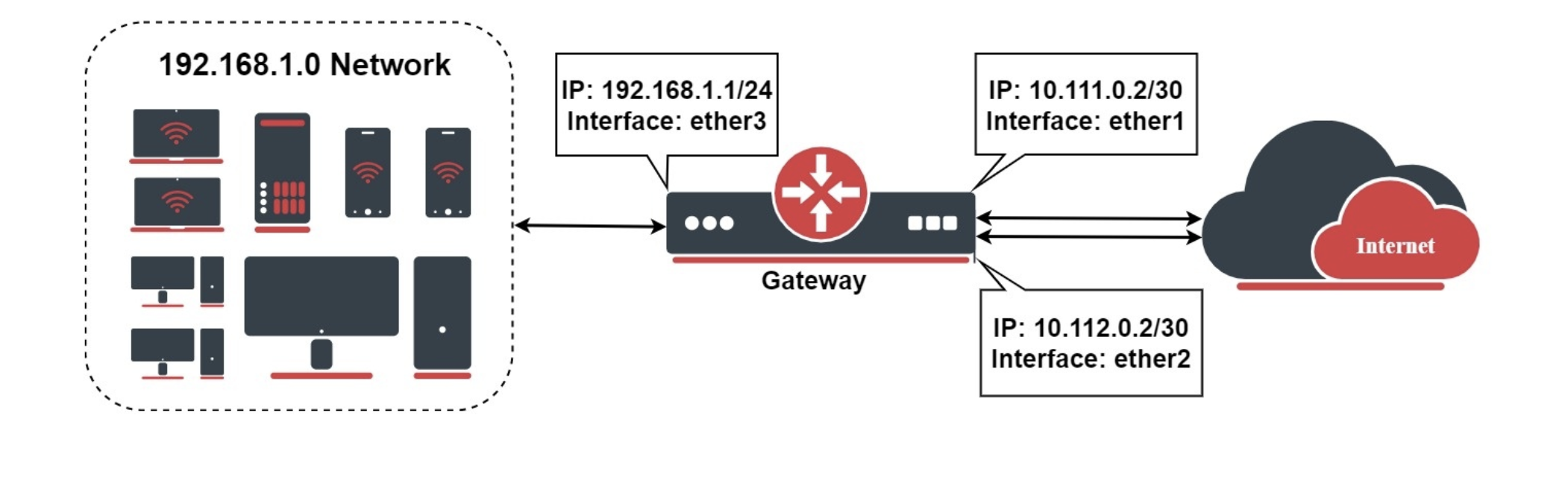
Let's assume that our gateway has two public network uplinks ("ISP1", "ISP2"). The first uplink should be preferred and the second one should act as a backup.
Then we mark traffic in two parts, one with the name "ISP1" and the second as "ISP2" which goes through the ether1 and ether2 accordingly. In this setup, we want to monitor two hosts: Host1 and Host2. We will use Google DNS servers with IP 8.8.8.8 (Host1) and 8.8.4.4 (Host2), but it is not mandatory to use these specific addresses.
Configuration
Basic Failover
Before configuring failover, we must masquerade LAN traffic going through both uplinks. This allows devices on your local network to access the internet through either connection:
/ip/firewall/nat
add chain=srcnat action=masquerade out-interface=ether1
add chain=srcnat action=masquerade out-interface=ether2
Next, we need to define two reachable hosts on the internet to monitor the status of each uplink. These hosts should be reliable and respond to ICMP requests. In this example, we use Google's DNS servers (8.8.8.8 and 8.8.4.4):
/ip/route
add dst-address=8.8.8.8 scope=10 gateway=10.111.0.1
add dst-address=8.8.4.4 scope=10 gateway=10.112.0.1
Finally, we add the default route that will be recursively resolved through both test hosts. The ISP1 connection serves as the primary link (configured with a lower distance value):
/ip/route/
add distance=1 gateway=8.8.8.8 target-scope=11 check-gateway=ping
add distance=2 gateway=8.8.4.4 target-scope=11 check-gateway=ping
This configuration ensures that if the primary uplink becomes unavailable, traffic automatically fails over to the secondary connection.
Improve Detection Reliability
Currently, we rely on a single host for link reachability monitoring. Although Google services are rarely unavailable, we can improve reliability by adding a second monitoring host on each link.
/ip/route
add dst-address=208.67.222.222 gateway=10.111.0.1 scope=10
add dst-address=208.67.220.220 gateway=10.112.0.1 scope=10

add distance=1 gateway=208.67.222.222 target-scope=11 check-gateway=ping
add distance=2 gateway=208.67.220.220 target-scope=11 check-gateway=ping
This configuration creates an ECMP default route. If only one gateway becomes unreachable, the default route on the first link remains active. Complete failover to the second link occurs only when all gateways hosts become unreachable.